For live streaming and content creation, I’d choose the 14-inch MacBook Pro with M5 Pro, 48GB memory, and 1TB storage as the best overall fit: it pairs current-generation processing power with enough memory for demanding creative sessions. The 2025 14-inch M5 model is a more balanced pick for creators who want a capable everyday laptop, while the 16-inch M5 Max with 128GB memory suits exceptionally heavy production workflows. The main tradeoffs are processing headroom versus portability, and the lower cost of older or renewed systems versus their age, condition, and limited memory. I compare all 12 options by how well their listed configurations match streaming and editing demands. Read on for the full breakdown and guidance on choosing the right MacBook Pro for your setup.

Prime made for students and young adults
- Fast, free delivery for dorm and study essentials
- Prime Video and Amazon Music included
- Member-only deals
Key Takeaways
- The M5 Pro 14-inch configuration ranks first for balance: its 48GB memory and 1TB SSD give demanding stream-and-edit workflows more breathing room than the 24GB M5 model.
- The M5 Max 16-inch is a specialist choice, not a default upgrade: its 128GB memory and 2TB SSD target large projects and heavy multitasking, but many creators will not need that much capacity.
- Screen size and memory matter as much as the chip: the 16-inch M1 Pro offers a larger workspace, while newer compact models offer more current hardware in a smaller format.
- Older 8GB configurations are the biggest compromise: several compact and renewed options list 8GB RAM and 256GB storage, leaving less room for simultaneous streaming, editing, and media files.
- Renewed models need extra scrutiny: the M2 Max and M4 Max renewed configurations have strong listed hardware, but buyers should weigh condition, battery health, and seller support against newer models.
| Apple MacBook Pro with M2 Chip, 13-inch Retina Display, 8GB RAM, 512GB SSD, Touch Bar, Backlit Keyboard, FaceTime HD Camera, Space Gray |  | Best Compact Starter | Display: 13-inch Retina LCD, 2560 x 1600 | Processor: Apple M2, 8-core CPU | Graphics: Integrated Apple GPU, up to 10 cores | VIEW ON AMAZON | See Our Full Breakdown |
| Apple 2020 MacBook Pro 13-inch with 2.3GHz Intel Core i7, 32GB RAM, 1TB SSD, Space Gray (Renewed) |  | Best for Memory-Heavy Multitasking | Display: 13-inch Retina with True Tone | Processor: 2.3GHz quad-core 10th-generation Intel Core i7 | Graphics: Intel Iris Plus | VIEW ON AMAZON | See Our Full Breakdown |
| Apple 2021 MacBook Pro (16.2-inch, M1 Pro chip, 10-core CPU, 16-core GPU, 16GB RAM, 512GB SSD) – Space Gray |  | Best for a Large Editing Workspace | Display: 16.2-inch Liquid Retina XDR | Processor: Apple M1 Pro, 10-core CPU | Graphics: 16-core GPU | VIEW ON AMAZON | See Our Full Breakdown |
| Apple MacBook Pro Laptop with M5 Pro Chip, 15-core CPU, 16-core GPU, 14.2-inch Liquid Retina XDR Display, 48GB RAM, 1TB SSD, Space Black |  | Best Overall for Professional Streaming | Display: 14.2-inch Liquid Retina XDR | Processor: Apple M5 Pro, 15-core CPU | Graphics: 16-core GPU | VIEW ON AMAZON | See Our Full Breakdown |
| Apple MacBook Pro with M2 Max Chip (16.2-inch, 32GB, 1TB SSD) – Space Gray (Renewed) |  | Best for Large-Scale Creative Work | Display: 16.2-inch | Processor: Apple M2 Max | Memory: 32GB | VIEW ON AMAZON | See Our Full Breakdown |
| Apple 2024 MacBook Pro 14-inch with M4 Max Chip, 36GB RAM, 1TB SSD, Silver (Renewed) |  | Best for Demanding Mobile Production | Processor: M4 Max chip | Display: 14.2-inch Liquid Retina XDR | Memory: 36GB RAM | VIEW ON AMAZON | See Our Full Breakdown |
| Apple MacBook Pro 13-inch (Renewed) |  | Best for Basic Streaming on a Tight Setup | Processor: 8th-generation Intel Core i5 | Display: 13-inch Retina with True Tone | Memory: 8GB RAM | VIEW ON AMAZON | See Our Full Breakdown |
| Apple MacBook Pro 13-inch with M1 Chip (Renewed, Space Gray, 8GB RAM, 256GB SSD) |  | Best Compact Option for New Creators | Processor: Apple M1 | Display: 13.3-inch Retina, 2560 x 1600 pixels | Memory: 8GB RAM | VIEW ON AMAZON | See Our Full Breakdown |
| Apple 13-inch MacBook Pro (Mid 2020, Space Gray, 8GB RAM, 256GB SSD, Core i5) |  | Best for Simple, Stationary Streams | Model year: Mid 2020 | Display: 13-inch | Processor: 1.4GHz Intel Core i5 | VIEW ON AMAZON | See Our Full Breakdown |
| Apple 2025 MacBook Pro Laptop with M5 Chip, 14.2-inch Liquid Retina XDR Display, 24GB Memory, 1TB SSD, Space Black |  | Best Newer-Generation All-Rounder | Processor: Apple M5 with 10-core CPU and GPU | Display: 14.2-inch Liquid Retina XDR | Memory: 24GB unified memory | VIEW ON AMAZON | See Our Full Breakdown |
| Apple MacBook Pro 16.2-inch with M5 Max, 128GB RAM, 2TB SSD, Space Black |  | Best for High-End Streaming and Production | Display: 16.2-inch Liquid Retina XDR | CPU: M5 Max, 18-core | GPU: 40-core | VIEW ON AMAZON | See Our Full Breakdown |
| Apple MacBook Pro MPXV2LL/A Laptop (Renewed, Space Gray, 13.3-inch, 256GB SSD, 8GB RAM, Mac OS) | 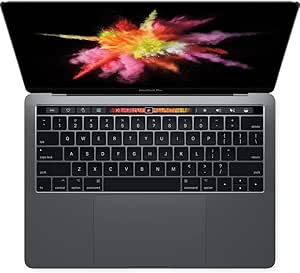 | Best for Basic, Budget-Conscious Streaming | Processor: 3.1GHz dual-core Intel Core i5 with Turbo Boost up to 3.5GHz | Memory: 8GB 2133MHz LPDDR3 | Storage: 256GB SSD | VIEW ON AMAZON | See Our Full Breakdown |
| macbook pro for live streaming and content creation | Display | Memory | Storage | Processor |
|---|---|---|---|---|
| Apple MacBook Pro with M2 Chip | 13-inch Retina LCD, 2560 x 1600 | 8GB unified memory | 512GB SSD | Apple M2, 8-core CPU |
| Apple 2020 MacBook Pro 13-inch | 13-inch Retina with True Tone | 32GB RAM | 1TB SSD | 2.3GHz quad-core 10th-generation Intel Core i7 |
| Apple 2021 MacBook Pro | 16.2-inch Liquid Retina XDR | 16GB RAM | 512GB SSD | Apple M1 Pro, 10-core CPU |
| Apple MacBook Pro Laptop with | 14.2-inch Liquid Retina XDR | 48GB unified memory | 1TB SSD | Apple M5 Pro, 15-core CPU |
| Apple MacBook Pro with M2 Max | 16.2-inch | 32GB | 1TB SSD | Apple M2 Max |
| Apple 2024 MacBook Pro 14-inch | 14.2-inch Liquid Retina XDR | 36GB RAM | 1TB SSD | M4 Max chip |
| Apple MacBook Pro 13-inch | 13-inch Retina with True Tone | 8GB RAM | 256GB SSD | 8th-generation Intel Core i5 |
| Apple MacBook Pro 13-inch with | 13.3-inch Retina, 2560 x 1600 pixels | 8GB RAM | 256GB SSD | Apple M1 |
| Apple 13-inch MacBook Pro | 13-inch | 8GB RAM | 256GB SSD | 1.4GHz Intel Core i5 |
| Apple 2025 MacBook Pro Laptop | 14.2-inch Liquid Retina XDR | 24GB unified memory | 1TB SSD | Apple M5 with 10-core CPU and GPU |
| Apple MacBook Pro 16.2-inch wi | 16.2-inch Liquid Retina XDR | 128GB unified memory | 2TB SSD | — |
| Apple MacBook Pro MPXV2LL/A La | 13.3-inch Retina, 2560 x 1600 resolution | 8GB 2133MHz LPDDR3 | 256GB SSD | 3.1GHz dual-core Intel Core i5 with Turbo Boost up to 3.5GHz |
More Details on Our Top Picks
Apple MacBook Pro with M2 Chip, 13-inch Retina Display, 8GB RAM, 512GB SSD, Touch Bar, Backlit Keyboard, FaceTime HD Camera, Space Gray
For a creator who needs a small MacBook Pro for livestreams, edits, and everyday production, this M2 model offers a more capable starting point than the older Intel MacBook Pro with 32GB RAM, especially for efficient everyday work. Its 13-inch Retina display keeps the laptop easy to carry, while the 512GB SSD gives you more room for project files than many entry configurations. The stated battery life of up to 20 hours also suits mobile recording days. The tradeoff is its 8GB unified memory: multitasking with a stream, browser tabs, and editing software can feel constrained, and two Thunderbolt 3 ports leave little room for peripherals without a hub. I’d choose it for a compact workflow, not sustained, layered video production.
Pros:- M2 chip is suited to everyday streaming and content work
- 512GB SSD provides useful space for active projects
- Up to 20 hours of stated battery life supports mobile work
- Compact 3-pound design with a 2560 x 1600 Retina display
Cons:- 8GB unified memory can restrict heavy multitasking and complex edits
- Two Thunderbolt 3 ports may require a hub for a camera, storage, and other gear
- FaceTime HD camera is a basic built-in option for direct-to-camera streams
Best for: New or occasional streamers who prioritize a lightweight MacBook Pro, battery life, and a 512GB drive for basic editing and live sessions.
Not ideal for: Creators who run streaming software alongside demanding editing tools, many browser tabs, or several external devices; 8GB memory and two Thunderbolt 3 ports can limit that setup.
- Display:13-inch Retina LCD, 2560 x 1600
- Processor:Apple M2, 8-core CPU
- Graphics:Integrated Apple GPU, up to 10 cores
- Memory:8GB unified memory
- Storage:512GB SSD
- Battery life:Up to 20 hours
- Ports:Thunderbolt 3
- Weight:3 pounds
Our verdict“Choose this compact M2 model for lighter streaming and editing on the go, but step up to a higher-memory Pro for demanding simultaneous workloads.”
Apple 2020 MacBook Pro 13-inch with 2.3GHz Intel Core i7, 32GB RAM, 1TB SSD, Space Gray (Renewed)
This renewed Intel model makes a specific case for creators who value 32GB RAM and a 1TB SSD more than newer chip architecture. That memory headroom can help when a livestream, production software, and numerous browser or reference windows need to stay open together. Compared with the 13-inch M2 MacBook Pro, it offers four times the listed memory and twice the storage, but its 10th-generation Intel Core i7 and Intel Iris Plus graphics are older foundations for demanding video workflows. The True Tone Retina display, Touch Bar, and Touch ID add useful day-to-day conveniences, while the renewed status makes warranty and device condition worth checking. I’d shortlist it for memory-intensive, mostly CPU-based work rather than graphics-heavy editing.
Pros:- 32GB RAM offers more multitasking headroom than the 8GB M2 13-inch model
- 1TB SSD accommodates larger local project libraries
- 13-inch Retina display includes True Tone
- Touch ID and Touch Bar provide convenient controls
Cons:- 10th-generation Intel processor and Iris Plus graphics are older than the M-series options here
- Renewed condition may mean cosmetic wear or variable remaining coverage
- USB-C port details are not specified, making accessory planning less certain
Best for: Streamers who keep many applications and browser tabs open and want substantial memory and local storage in a 13-inch MacBook Pro.
Not ideal for: Creators prioritizing current-generation performance, graphics-heavy effects, or a clearly specified multiport setup; the older Intel platform and renewed condition are tradeoffs.
- Display:13-inch Retina with True Tone
- Processor:2.3GHz quad-core 10th-generation Intel Core i7
- Graphics:Intel Iris Plus
- Memory:32GB RAM
- Storage:1TB SSD
- Ports:USB-C
- Warranty:1-year limited
Our verdict“Pick this renewed Intel model if RAM and storage take priority over newer chip performance, and verify its condition and coverage before buying.”
Apple 2021 MacBook Pro (16.2-inch, M1 Pro chip, 10-core CPU, 16-core GPU, 16GB RAM, 512GB SSD) – Space Gray
The 2021 16-inch MacBook Pro is the lineup’s more balanced choice for creators who want a substantial built-in canvas without moving to the M2 Max or newer M5 Pro models. Its 16.2-inch Liquid Retina XDR display gives timelines, preview windows, and control panels more room than the compact 13-inch M2, while the M1 Pro’s 10-core CPU and 16-core GPU target heavier creative work. A 1080p FaceTime HD camera is a more capable built-in option for calls and streams than the basic camera listed on the M2 model. The 16GB memory and 512GB SSD are less generous than the newer M5 Pro’s 48GB and 1TB, though, so demanding projects may call for external storage and careful app management. Its larger chassis also favors desk sessions over frequent travel.
Pros:- 16.2-inch Liquid Retina XDR display gives editing timelines and previews room
- M1 Pro combines a 10-core CPU with a 16-core GPU
- 1080p FaceTime HD camera is useful for direct-to-camera sessions
- Up to 21 hours of stated battery life
Cons:- 16GB RAM is below the 32GB M2 Max and 48GB M5 Pro configurations in this batch
- 512GB SSD may fill quickly with video footage and project files
- Large 16.2-inch form factor is less convenient for frequent travel
Best for: Video creators and streamers who want a large, high-contrast built-in display for editing and monitoring, with enough performance for serious but not extreme workloads.
Not ideal for: Buyers needing the highest memory capacity, maximum headroom for large projects, or a small travel-friendly laptop; the M5 Pro has more memory and the 16-inch body is less compact.
- Display:16.2-inch Liquid Retina XDR
- Processor:Apple M1 Pro, 10-core CPU
- Graphics:16-core GPU
- Memory:16GB RAM
- Storage:512GB SSD
- Battery life:Up to 21 hours
- Camera:1080p FaceTime HD
- Audio:Six-speaker system with force-cancelling woofers
Our verdict“Choose the 2021 M1 Pro when display space and capable editing performance matter more than the extra memory and storage of newer configurations.”
Apple MacBook Pro Laptop with M5 Pro Chip, 15-core CPU, 16-core GPU, 14.2-inch Liquid Retina XDR Display, 48GB RAM, 1TB SSD, Space Black
This M5 Pro configuration ranks first for creators who need one machine to handle live production, editing, and a busy peripheral setup. Its 48GB unified memory gives more room for streaming software and creative applications to run together than the 16GB M1 Pro, while the 15-core CPU, 16-core GPU, and 1TB SSD provide a strong base for demanding projects. The 14.2-inch Liquid Retina XDR screen keeps the laptop more compact than the 16.2-inch M2 Max, yet its listed ports—Thunderbolt 5, MagSafe 3, SDXC, and HDMI—make it easier to connect cameras, cards, and displays. The tradeoff is that this much capability may exceed a beginner’s needs, and the 14-inch screen offers less editing space than either 16-inch model.
Pros:- 48GB unified memory suits concurrent streaming and creative applications
- 15-core CPU and 16-core GPU target professional workloads
- 1TB SSD gives more local project capacity than the 512GB models
- Thunderbolt 5, HDMI, SDXC, and MagSafe 3 support varied production setups
Cons:- 14.2-inch display provides less timeline space than the 16.2-inch M1 Pro and M2 Max models
- High-end specifications can be unnecessary for basic streaming and occasional edits
- Advanced features and Apple ecosystem integration may be a poor fit for buyers seeking a platform-neutral setup
Best for: Professional streamers and video creators who run several demanding apps, connect cameras or displays, and want substantial memory in a more compact Pro chassis.
Not ideal for: Casual creators who mainly stream and make light edits, or editors who value a 16-inch workspace above portability; this configuration may be more machine than their workflow needs.
- Display:14.2-inch Liquid Retina XDR
- Processor:Apple M5 Pro, 15-core CPU
- Graphics:16-core GPU
- Memory:48GB unified memory
- Storage:1TB SSD
- Ports:Three Thunderbolt 5, MagSafe 3, SDXC, HDMI, headphone jack
- Connectivity:Wi-Fi 7, Bluetooth 6
- Camera:12MP Center Stage
Our verdict“For demanding live production in a comparatively compact laptop, the M5 Pro is my strongest all-around pick, provided you can use its performance and memory headroom.”
Apple MacBook Pro with M2 Max Chip (16.2-inch, 32GB, 1TB SSD) – Space Gray (Renewed)
The renewed M2 Max is the pick for creators who want a 16.2-inch workspace and substantial graphics capability without choosing the newer M5 Pro’s smaller display. Its M2 Max chip, 32GB memory, and 1TB SSD make it a stronger fit for complex editing and large media libraries than the 16GB M1 Pro, while the HDMI, SDXC, and three Thunderbolt 4 ports simplify connecting production gear. Up to 22 hours of stated battery life and a six-speaker system add appeal for mobile editing and monitoring. The M5 Pro offers 48GB memory and newer Thunderbolt 5 ports, so it is the better match for memory-heavy multitasking and newer connectivity. This M2 Max is also renewed, which makes device condition and coverage part of the buying decision.
Pros:- M2 Max chip is aimed at demanding creative workloads
- 32GB memory and 1TB SSD suit larger editing projects
- 16.2-inch display offers more workspace than the 14.2-inch M5 Pro
- MagSafe, three Thunderbolt 4 ports, SDXC, HDMI, and headphone jack support production gear
Cons:- Renewed status may involve cosmetic wear or less predictable coverage
- 32GB memory is below the M5 Pro’s 48GB configuration
- 16.2-inch chassis is less convenient for frequent travel
Best for: Video editors and established streamers who need a 16-inch workspace, strong graphics performance, 1TB of storage, and built-in ports for production accessories.
Not ideal for: Buyers who need the newest listed chip and maximum memory, prefer a smaller laptop, or want to avoid the condition uncertainty that can come with a renewed device.
- Display:16.2-inch
- Processor:Apple M2 Max
- Memory:32GB
- Storage:1TB SSD
- Battery life:Up to 22 hours
- Ports:MagSafe, three Thunderbolt 4, SDXC, HDMI, headphone jack
- Wireless:Wi-Fi 6E, Bluetooth 5.3
- Camera:1080p FaceTime HD
- Audio:Six-speaker system with Spatial Audio
Our verdict“Choose this renewed M2 Max for demanding creative work on a large screen, but favor the M5 Pro for more memory and newer ports.”
Apple 2024 MacBook Pro 14-inch with M4 Max Chip, 36GB RAM, 1TB SSD, Silver (Renewed)
For creators who stream while editing high-resolution footage or running several production apps, the M4 Max chip and 36GB of memory offer far more headroom than the 8GB 13-inch models in this roundup. Its 14.2-inch Liquid Retina XDR display gives you a sharp workspace for reviewing footage, while Thunderbolt 5, HDMI, SDXC, and MagSafe make it easier to connect a camera, display, and storage without building your setup around adapters. Compared with the 2025 M5 MacBook Pro, this renewed model emphasizes higher-tier Max-class processing, while the M5 model offers a newer chip and a 12MP Center Stage camera. The tradeoff is the renewed condition: warranty coverage may be limited, and the powerful hardware is more than many single-camera streamers need. I’d choose it for demanding mobile production, not casual broadcasting.
Pros:- M4 Max chip and 36GB RAM provide headroom for demanding creative multitasking.
- Liquid Retina XDR display supports detailed footage review.
- Thunderbolt 5, HDMI, and SDXC simplify connections to production gear.
- All-day battery life supports work away from an outlet.
Cons:- Renewed condition may come with limited warranty coverage.
- M4 Max performance may be unnecessary for basic livestreaming and light editing.
- The 14-inch model is still a substantial machine for frequent portable use.
Best for: Mobile video creators who stream while editing demanding footage, run multiple creative apps, and want built-in ports for cameras and external displays.
Not ideal for: New creators with a basic single-camera setup, or buyers who want a new device and predictable warranty coverage rather than a renewed model.
- Processor:M4 Max chip
- Display:14.2-inch Liquid Retina XDR
- Memory:36GB RAM
- Storage:1TB SSD
- Ports:Three Thunderbolt 5, MagSafe 3, SDXC, HDMI, headphone jack
- Battery life:All-day
- Color:Silver
- Condition:Renewed
Our verdict“Choose this renewed M4 Max when demanding mobile editing and streaming matter more than buying new or keeping performance modest.”
Apple MacBook Pro 13-inch (Renewed)
This renewed 13-inch MacBook Pro is a modest entry point for basic livestreaming, calls, and light content work, rather than a machine for ambitious editing. Its 8th-generation quad-core Intel Core i5 and 8GB of RAM can suit simpler workloads, but they leave less room for a streaming app, browser sources, and editing software to run together than the 8GB M1 MacBook Pro in this list. The 13-inch Retina display with True Tone keeps the picture clear for everyday tasks, and Touch ID adds convenient access. Compared with that M1 model, this Intel version has a Touch Bar but lacks the listed up-to-20-hour battery claim and newer Apple silicon. The 256GB SSD also leaves little room for recordings, so external storage is likely for regular video work. Its renewed status adds warranty uncertainty.
Pros:- Retina display with True Tone supports clear everyday viewing.
- Quad-core Intel Core i5 handles basic productivity and content tasks.
- Touch ID offers convenient authentication.
- Compact 13-inch format is easy to fit into a small work setup.
Cons:- 8GB RAM limits multitasking headroom for streaming and editing together.
- 256GB SSD can fill quickly with recordings and project files.
- Renewed condition may mean limited warranty coverage.
Best for: Students or first-time creators who need a compact MacBook for calls, simple streams, and light editing, and already have external storage.
Not ideal for: Creators who plan to edit long videos, keep large project libraries locally, or run several demanding production apps while streaming.
- Processor:8th-generation Intel Core i5
- Display:13-inch Retina with True Tone
- Memory:8GB RAM
- Storage:256GB SSD
- Graphics:Intel Iris Plus Graphics 645
- Features:Touch Bar and Touch ID
- Color:Space Gray
- Condition:Renewed
Our verdict“Pick this model for basic streaming and light editing on a compact Mac, but step up to the M1 13-inch for a better fit with creative workloads.”
Apple MacBook Pro 13-inch with M1 Chip (Renewed, Space Gray, 8GB RAM, 256GB SSD)
The 13-inch M1 MacBook Pro is the most balanced compact choice here for a creator starting with simple streams and short-form edits. Its Apple silicon and 8-core GPU give it a stronger foundation for creative apps than the renewed Intel Core i5 13-inch model, while the listed battery life of up to 20 hours suits creators who work away from a desk. The 13.3-inch Retina display is compact but detailed enough for basic edits and stream controls. There are limits: 8GB of memory can constrain heavier multitasking, and 256GB fills quickly once recordings and source files accumulate. Compared with the 2025 14-inch M5 MacBook Pro, this is smaller and less suited to advanced production, but also avoids carrying hardware many beginners won’t use. Renewed condition can vary, so buyers should factor that into their choice.
Pros:- M1 chip and 8-core GPU provide a capable base for beginner creative tasks.
- Up to 20 hours of listed battery life supports mobile work.
- 2560 x 1600 Retina display gives a detailed workspace in a compact size.
- Portable 13.3-inch design is easier to carry than the 14-inch production models.
Cons:- 8GB RAM can limit complex streaming and editing multitasking.
- 256GB SSD provides limited room for video projects and recordings.
- Renewed condition may vary, and graphics memory is shared rather than dedicated.
Best for: New creators who want a portable Mac for a single-camera stream, basic editing, and everyday work, with a plan to store larger projects externally.
Not ideal for: Creators who need multiple demanding apps open at once, routinely edit high-resolution footage, or want ample internal space for recordings.
- Processor:Apple M1
- Display:13.3-inch Retina, 2560 x 1600 pixels
- Memory:8GB RAM
- Storage:256GB SSD
- Graphics:8-core GPU, shared graphics memory
- Battery life:Up to 20 hours
- Weight:3 pounds
- Condition:Renewed
Our verdict“Choose the renewed M1 13-inch for portable beginner streaming and light edits, but favor a newer 14-inch model for heavier production.”
Apple 13-inch MacBook Pro (Mid 2020, Space Gray, 8GB RAM, 256GB SSD, Core i5)
This renewed mid-2020 Intel model makes the most sense for a creator whose setup is already modest: simple streams, calls, and basic editing, without a large local video library. Its 1.4GHz Core i5, 8GB RAM, and 256GB SSD are more constrained for production than the M1 13-inch MacBook Pro in this roundup, so I’d favor the M1 if both are being considered for regular editing. The stated inspection and battery-capacity details offer useful condition information, but they do not change the machine’s older Intel platform or limited memory. It can serve as an entry-level computer when the workflow is light and external storage is available. The tradeoff is clear: limited headroom for multitasking, along with uncertainty around non-original accessories and a generic box.
Pros:- Professionally inspected and tested according to the product description.
- Listed battery capacity exceeds 80%.
- 256GB SSD supports quick access to frequently used files.
- Compact 13-inch form is manageable for a fixed or occasional mobile setup.
Cons:- 1.4GHz Core i5 and 8GB RAM offer limited capacity for demanding streaming workflows.
- 256GB storage is restrictive for keeping video projects locally.
- Renewed unit may arrive in a generic box with non-original accessories.
Best for: A budget-conscious creator who needs a secondary Mac for basic calls or simple streams and can keep demanding editing on another computer.
Not ideal for: Video creators who want a primary machine for live production, frequent editing, or running several apps and browser sources simultaneously.
- Model year:Mid 2020
- Display:13-inch
- Processor:1.4GHz Intel Core i5
- Memory:8GB RAM
- Storage:256GB SSD
- Color:Space Gray
- Condition:Renewed
- Battery condition:Capacity over 80%
Our verdict“Consider this renewed Intel model for basic streaming or backup duties, but choose the M1 13-inch for a more capable creative primary machine.”
Apple 2025 MacBook Pro Laptop with M5 Chip, 14.2-inch Liquid Retina XDR Display, 24GB Memory, 1TB SSD, Space Black
The 2025 14-inch MacBook Pro is the strongest all-rounder in this batch for creators who want a newer-generation machine with practical streaming features. Its M5 chip, 24GB unified memory, and 1TB SSD give a streamer more room for production software, browser sources, and saved recordings than the 8GB renewed 13-inch options. The 12MP Center Stage camera can keep a presenter framed during calls, while the six-speaker system with Spatial Audio and Dolby Atmos offers capable built-in playback for monitoring and review. Compared with the renewed M4 Max 14-inch, this model has a newer chip and more specified camera and audio features, while the M4 Max offers 36GB RAM and Thunderbolt 5. Its Thunderbolt 4 ports are ample for many setups, though demanding multi-device workflows may prefer the M4 Max’s faster ports. This is a capable choice, not a reason for every casual streamer to upgrade.
Pros:- M5 chip and 24GB unified memory support demanding creative multitasking.
- 1TB SSD leaves more room for active footage and recordings than 256GB models.
- 12MP Center Stage camera is suited to presenter-focused calls and streams.
- Six-speaker system with Spatial Audio and Dolby Atmos supports built-in playback.
Cons:- Thunderbolt 4 is a step below the M4 Max model’s listed Thunderbolt 5 ports.
- 24GB memory is less than the renewed M4 Max model’s 36GB.
- High-end 14-inch hardware may be excessive for basic streaming and occasional edits.
Best for: Creators seeking a current 14-inch MacBook Pro for regular streaming, editing, video calls, and a mix of built-in and external production gear.
Not ideal for: Heavy editors who prioritize 36GB memory and Thunderbolt 5, or casual streamers who do not need a high-spec 14-inch production laptop.
- Processor:Apple M5 with 10-core CPU and GPU
- Display:14.2-inch Liquid Retina XDR
- Memory:24GB unified memory
- Storage:1TB SSD
- Ports:Three Thunderbolt 4, MagSafe 3, SDXC card slot, HDMI, headphone jack
- Camera:12MP Center Stage
- Audio:Six speakers with Spatial Audio and Dolby Atmos
- Color:Space Black
Our verdict“Choose the M5 14-inch for a newer, well-rounded streaming and editing setup, or the M4 Max if memory headroom and Thunderbolt 5 take priority.”
Apple MacBook Pro 16.2-inch with M5 Max, 128GB RAM, 2TB SSD, Space Black
For creators running demanding live productions, this configuration pairs an 18-core M5 Max CPU and 40-core GPU with 128GB of unified memory. That headroom can help when streaming, editing high-resolution footage, and keeping resource-heavy creative apps open at once. The 16.2-inch Liquid Retina XDR display gives a larger, high-contrast workspace than the 14.2-inch M5 Pro model, while HDMI, SDXC, and three Thunderbolt 5 ports make connecting cameras, storage, and displays more straightforward. Its 2TB SSD also leaves more room for active projects than the 1TB drives in several alternatives. The tradeoff is portability: this is a large, heavy machine, and its considerable capabilities exceed the needs of many single-camera streamers. I’d choose it over the M5 Pro when complex production workloads justify the extra capacity.
Pros:- M5 Max CPU and GPU are suited to demanding creative and streaming workloads
- 128GB unified memory supports keeping multiple resource-heavy tasks open
- 16.2-inch Liquid Retina XDR display offers a large, high-contrast editing workspace
- Thunderbolt 5, HDMI, and SDXC provide flexible connections for production gear
Cons:- Large, heavy design is less convenient to carry than smaller MacBook Pro models
- Its high-end configuration may be unnecessary for simpler streaming and editing setups
- The listed memory configuration is fixed at 128GB
Best for: Professional streamers and video creators who run demanding production software, work with large media projects, and need substantial memory and built-in connection options.
Not ideal for: Travel-focused creators or single-camera streamers with light editing needs; the large chassis and high-end performance may be more than their workflows require.
- Display:16.2-inch Liquid Retina XDR
- CPU:M5 Max, 18-core
- GPU:40-core
- Memory:128GB unified memory
- Storage:2TB SSD
- Ports:Three Thunderbolt 5, MagSafe 3, SDXC, HDMI, headphone jack
- Wireless:Wi-Fi 7, Bluetooth 6
Our verdict“Choose this model for demanding, multi-app streaming and production work when performance, memory, and connection options matter more than portability.”
Apple MacBook Pro MPXV2LL/A Laptop (Renewed, Space Gray, 13.3-inch, 256GB SSD, 8GB RAM, Mac OS)
This renewed 13.3-inch MacBook Pro is the lightweight, lower-capacity choice in a lineup that also includes much newer Apple silicon models. Its 2-pound body and Retina display suit a creator who prioritizes portability and handles simple streams, basic edits, or everyday publishing rather than demanding production. The dual-core Intel Core i5 and 8GB of RAM are a much narrower fit than the M5 Max model’s 128GB, so I would not choose this for complex live workflows or intensive video editing. Its 256GB SSD can also fill quickly once footage and project files accumulate; an external drive may be needed. Compared with the M1 MacBook Pro 13-inch in this roundup, this older Intel configuration offers less headroom for modern creative workloads. The renewed condition also means buyers should check the seller’s condition and return details.
Pros:- Light 2-pound design is easy to carry between locations
- 2560 x 1600 Retina display provides a detailed workspace
- SSD storage supports responsive access to files and apps
- Backlit keyboard supports work in dim streaming setups
Cons:- 8GB RAM and dual-core Intel processor leave limited headroom for demanding creative workloads
- 256GB SSD may require external storage for video projects
- Renewed condition can vary, and the listed battery life is unspecified
Best for: A mobile beginner who needs a compact Mac for basic streaming, light creative tasks, and everyday work, and is comfortable managing a small internal drive.
Not ideal for: Creators editing high-resolution footage, running several production apps at once, or needing ample onboard storage; 8GB RAM, integrated graphics, and a 256GB SSD limit that use.
- Processor:3.1GHz dual-core Intel Core i5 with Turbo Boost up to 3.5GHz
- Memory:8GB 2133MHz LPDDR3
- Storage:256GB SSD
- Display:13.3-inch Retina, 2560 x 1600 resolution
- Graphics:Intel Iris Plus Graphics 650
- Weight:2 pounds
- Battery:54.5-watt-hour lithium-ion
- Connectivity:USB, Wi-Fi 802.11ac, Bluetooth
Our verdict“Pick this renewed model for portable, basic streaming and everyday creative work, but choose a newer Apple silicon MacBook Pro for sustained editing or complex live productions.”

How We Picked
I ranked these MacBook Pros by their fit for a realistic creator workload: running a streaming application alongside a browser, audio tools, and video editing software, then handling footage and project files. I gave more weight to listed memory, processor generation and tier, storage capacity, and screen workspace than to product labels alone. For streaming and editing together, memory and storage can shape day-to-day smoothness as much as raw chip performance.
The ranking favors well-balanced configurations first, then separates premium workstations from lower-cost or older alternatives. That is why the M5 Pro with 48GB memory leads, while the M5 Max with 128GB memory earns a place for specialized workloads rather than universal value. Older Intel and entry-level 8GB models rank lower because their listed configurations leave less headroom for modern multitasking. Several listings are renewed or provide limited configuration detail, so I treat condition and exact specifications as buyer checks, not assumed advantages.
| macbook pro for live streaming and content creation | Ports |
|---|---|
| Apple MacBook Pro with M2 Chip | Thunderbolt 3 |
| Apple 2020 MacBook Pro 13-inch | USB-C |
| Apple 2021 MacBook Pro | — |
| Apple MacBook Pro Laptop with | Three Thunderbolt 5, MagSafe 3, SDXC, HDMI, headphone jack |
| Apple MacBook Pro with M2 Max | MagSafe, three Thunderbolt 4, SDXC, HDMI, headphone jack |
| Apple 2024 MacBook Pro 14-inch | Three Thunderbolt 5, MagSafe 3, SDXC, HDMI, headphone jack |
| Apple MacBook Pro 13-inch | — |
| Apple MacBook Pro 13-inch with | — |
| Apple 13-inch MacBook Pro | — |
| Apple 2025 MacBook Pro Laptop | Three Thunderbolt 4, MagSafe 3, SDXC card slot, HDMI, headphone jack |
| Apple MacBook Pro 16.2-inch wi | Three Thunderbolt 5, MagSafe 3, SDXC, HDMI, headphone jack |
| Apple MacBook Pro MPXV2LL/A La | — |
Factors to Consider When Choosing Macbook Pro For Live Streaming And Content Creation
Choosing a MacBook Pro for streaming is not just a matter of picking the newest chip. I’d start with the workload you actually run, then match memory, storage, and screen size to that setup. These broader tradeoffs can prevent paying for capacity you will not use—or buying a machine that feels cramped once your stream and editing tools are open together.
Match Memory to the Number of Apps You Run
A stream can involve more than the broadcasting app: chat, a browser, audio routing, graphics, and recording may all run at once. Editing footage during or after a session adds another demand, so the right memory target depends on how much you multitask and how complex your projects are. A common mistake is choosing a system based only on chip name while overlooking a modest memory configuration. If your work is mostly one application at a time, a middle configuration can be sensible; if you routinely keep creative tools open together, extra memory can extend the machine’s usefulness. I would treat 8GB listings as entry-level options for light duties, not comfortable all-purpose streaming work.
Choose Storage Around Your Footage Workflow
Video files, screen recordings, and project caches can fill internal storage faster than everyday documents. A 256GB configuration may work if you regularly move finished projects to external storage, but it leaves little room for a growing media library and active editing files. A 1TB drive gives more flexibility for working projects, though it does not replace a backup plan. Buyers often confuse internal capacity with long-term archiving: external drives can expand storage, but they add cost, cables, and another item to manage. If you record long sessions or keep several projects active, include storage needs in the budget and workflow from the start.
Buy the Chip Tier for Your Actual Production Load
More powerful chip tiers make the most sense when a workload can use their added processing and graphics capacity, such as frequent high-resolution editing or demanding effects work. A live stream with a simple scene setup may not benefit as much as a creator rendering complex projects or managing several production tasks together. The mistake is paying for a premium chip simply because it sits at the top of a product family. Compare that upgrade with spending on memory, storage, a camera, microphone, lighting, or capture equipment that may improve the whole setup more. For mixed streaming and content creation, a balanced configuration can be more useful than the highest chip tier paired with compromises elsewhere.
Decide Whether a Larger Display Helps Your Setup
A larger built-in display gives more room for an editing timeline, stream controls, and reference material without constant window switching. That can be valuable if the MacBook Pro is your main workstation, especially when working away from a desk. A smaller model is easier to carry and may suit creators who connect to an external monitor at home or in a studio. Do not assume the biggest screen automatically improves a stream: the audience sees the output, not the laptop display, and a second monitor can provide similar workspace at a fixed desk. Think about where you create most often before paying the portability and size tradeoff.
Treat Renewed Status as a Separate Buying Decision
A renewed MacBook Pro can offer a strong hardware configuration, but the model name does not tell you the condition of the battery, display, keyboard, or ports. Check the seller’s return window, warranty terms, battery-health policy, and what accessories are included before comparing it with a new system. Older machines may also have less remaining software support and less headroom for newer creative tools than current-generation options. A low-memory renewed model is not automatically a better creator purchase than a newer configuration with more memory. I would favor a renewed listing only when its exact configuration fits the workload and the condition protections are clear.
Frequently Asked Questions
Is 8GB of memory enough for live streaming and video editing?
It can handle light use, such as a basic stream or simple edits, but it leaves limited room for a browser, chat, audio tools, and recording software to run together. That makes the 8GB configurations in this roundup harder to recommend for frequent multitasking. If you plan to edit footage while managing a stream or keep several creative apps open, a higher-memory model is a safer fit. Also check the memory configuration before buying a listing with a broad or incomplete model name. Storage and chip choice matter too, but neither removes the limits of a small memory pool.
Should I choose the M5 Pro model or the M5 Max model for creator work?
I’d choose the M5 Pro with 48GB memory for a strong mix of streaming, editing, and everyday use. The M5 Max configuration with 128GB memory and 2TB storage is better suited to unusually demanding production, large projects, or workflows that can make use of substantial processing and memory capacity. Its specifications are far beyond what a simple live stream needs. Before paying for the higher tier, identify a real workload bottleneck rather than assuming a bigger chip will improve every task. For many creators, keeping more budget for recording gear or storage may bring greater practical value.
Is a renewed MacBook Pro a sensible choice for streaming?
It can be, particularly when the renewed model has ample memory and storage for your workflow, as the listed M2 Max and M4 Max options do. The risk is that renewed condition varies, and the listing alone may not clarify battery health, prior wear, or the support available if a fault appears. Check the exact processor, memory, storage, return policy, and warranty before deciding. Older renewed systems with 8GB memory are a different proposition from high-spec renewed models, even if both carry the same product family name. Compare the total risk and configuration, not just the renewed label.
Do I need a 16-inch MacBook Pro if I already use an external monitor?
Not necessarily. An external monitor can provide generous editing and control space at a fixed desk, which makes a 14-inch or 13-inch laptop easier to carry between locations. The 16-inch screen is more useful when you often work away from a desk or want your timeline and stream controls visible on one built-in display. Screen size does not directly determine streaming quality, so it should not outrank memory or workflow needs. Also account for the space and portability tradeoff before choosing a larger model. If your monitor is central to your setup, a smaller laptop may be the more practical match.
Should I buy a 256GB MacBook Pro and rely on external storage?
That setup can work if you regularly move completed projects off the laptop and are comfortable keeping active footage on an external drive. It is less convenient if you record long streams, keep several edits in progress, or want your project files available without connecting extra hardware. External storage also adds a backup responsibility: one drive should not be the only copy of important work. Compare the cost and portability of the drive with choosing a larger internal SSD at purchase. For creators with growing footage libraries, 1TB offers more working room, though regular archiving still matters.
Conclusion
Best overall: I recommend the 14-inch M5 Pro with 48GB memory and 1TB SSD for creators who want current performance and headroom for streaming alongside editing. Best value: the 2025 14-inch M5 with 24GB memory and 1TB storage is the more balanced pick for everyday creator work without moving to a Max-tier configuration. Best premium: choose the 16-inch M5 Max with 128GB memory and 2TB SSD when your production workload can use that capacity. Best for beginners: the 13-inch M1 model can suit light streaming and basic content work if its 8GB memory and 256GB storage fit your limits; skip it for heavier multitasking. Best for specific needs: the 16-inch M1 Pro offers a larger workspace, while the renewed M2 Max and M4 Max options suit buyers seeking high-end listed specifications who are willing to check condition and support carefully. Match the configuration to your actual workload, and favor adequate memory and storage over buying a chip tier you cannot use.