When searching for premium NAS storage solutions, the goal is to balance high performance, reliability, and expandability. The Synology DS1825+ stands out as the best overall due to its enterprise-grade features and massive capacity. For those prioritizing speed, the DS1621+ offers robust performance with 10GbE support. The main tradeoffs involve choosing between raw power and ease of use, as more advanced models often come with increased complexity and higher costs. Continue reading for a detailed breakdown of these top-tier options that cater to professionals and demanding users alike.

Prime made for students and young adults
- Fast, free delivery for dorm and study essentials
- Prime Video and Amazon Music included
- Member-only deals
Key Takeaways
- The best premium NAS solutions excel in scalability, often supporting dozens of drives for future growth.
- Performance features like 10GbE and high RAM are key for handling intensive tasks like 4K editing or large backups.
- Many top models prioritize enterprise reliability, which justifies higher costs but may be overkill for home use.
- Most premium NAS units require technical know-how for setup and maintenance, especially those with advanced networking features.
- Value in this category hinges on matching specific needs—more capacity and speed for professionals, simpler models for small businesses or home users.
| Synology DS425+ 4-Bay Diskless NAS Private Cloud Media Server |  | Best Overall for Small Business Centralized Storage | Storage Bays: 4 | Network Speed: 278 MB/s | User Support: 10+ users | VIEW ON AMAZON | See Our Full Breakdown |
| Synology DS225+ Private Cloud Media Server – 2-Bay Diskless NAS with Intel CPU |  | Best for Home and Small Office Private Cloud & Media Streaming | Model: DS225+ | Type: Private Cloud Media Server | Number of Bays: 2 | VIEW ON AMAZON | See Our Full Breakdown |
| Synology 2-Bay DiskStation DS223j (Diskless) |  | Best Compact and Energy-Efficient for Personal Use | Brand: Synology | Model Number: DS223j | Number of Bays: 2 | VIEW ON AMAZON | See Our Full Breakdown |
| Synology DS1525+ Video Editing & Production Server – 5-Bay NAS, 300TB Capacity, 10GbE Ready |  | Best for Professional Video Workflows and Large-Scale Storage | Storage Capacity: up to 300TB | Number of Bays: 5 | Network Speed: 10GbE | VIEW ON AMAZON | See Our Full Breakdown |
| Synology 6-Bay NAS DiskStation DS1621+ (Diskless) |  | Best for Scalability and Enterprise-Level Data Protection | Number of Bays: 6 | Max Drive Expansion: 16 drives | Network Compatibility: Supports 10GbE via optional NIC | VIEW ON AMAZON | See Our Full Breakdown |
| Synology 4-Bay DiskStation DS925+ (Diskless) |  | Best Overall High-Performance NAS for Versatility | Drive Bays: 4 | Network Ports: 2 x 2.5GbE | Max Sequential Read: 522 MB/s | VIEW ON AMAZON | See Our Full Breakdown |
| Synology DS925+ 4-Bay NAS with 2.5GbE Ports, Ryzen V1500B, 4GB RAM, 32TB Bundle with 4x 8TB Seagate Ironwolf HDDs |  | Best for Power Users Needing Performance and Expandability | Processor: AMD Ryzen V1500B quad-core | RAM: 4 GB DDR4 ECC (expandable up to 32 GB) | Drive Bays: 4 hot-swappable 2.5″/3.5″ bays | VIEW ON AMAZON | See Our Full Breakdown |
| Synology DS1825+ Enterprise NAS – 8-Bay Diskless Storage, 360TB Capacity, 25GbE Speed, Enterprise Reliability |  | Best for Large-Scale Media and Enterprise-Grade Storage | Storage Capacity: up to 360TB | Number of Bays: 8 | Network Speed: 25GbE | VIEW ON AMAZON | See Our Full Breakdown |
| Synology DS223 Home & Office 2-Bay Diskless NAS | 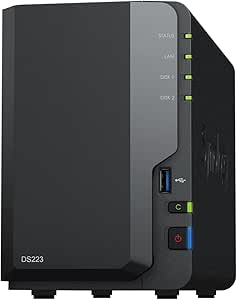 | Best Compact NAS for Home and Small Office Use | Storage Bays: 2 | Type: Diskless NAS | Warranty: 2 years | VIEW ON AMAZON | See Our Full Breakdown |
| Synology DS725+ Expandable NAS Storage – 2-Bay Diskless Private Cloud for Home and Small Business |  | Best Scalable Private Cloud for Growing Small Businesses | Number of Bays: 2 | Maximum Storage Capacity: 140TB with expansion | Expansion Unit: DX525 | VIEW ON AMAZON | See Our Full Breakdown |
| Synology DS1525+ 5-Bay NAS with 2.5GbE Ports, Ryzen V1500B, 8GB RAM, 20TB Bundle with 5x 4TB Seagate Ironwolf HDDs |  | Best Overall Premium NAS for Scalability and Advanced Features | Number of Bays: 5 | Network Ports: 2x 2.5GbE | Processor: Ryzen V1500B | VIEW ON AMAZON | See Our Full Breakdown |
| premium nas storage solution | Warranty | Number of Bays |
|---|---|---|
| Synology DS425+ 4-Bay Diskless | 3 years | — |
| Synology DS225+ Private Cloud | 3 years | 2 |
| Synology 2-Bay DiskStation DS2 | 2 years | 2 |
| Synology DS1525+ Video Editing | 3 years | 5 |
| Synology 6-Bay NAS DiskStation | 3 years | 6 |
| Synology 4-Bay DiskStation DS9 | 3 years | — |
| Synology DS925+ 4-Bay NAS with | — | — |
| Synology DS1825+ Enterprise NA | 3 years | 8 |
| Synology DS223 Home & Office 2 | 2 years | — |
| Synology DS725+ Expandable NAS | 3 years | 2 |
| Synology DS1525+ 5-Bay NAS wit | — | 5 |
More Details on Our Top Picks
Synology DS425+ 4-Bay Diskless NAS Private Cloud Media Server
The Synology DS425+ stands out as the best choice for small businesses needing robust, high-speed storage and comprehensive data protection. Its 278 MB/s transfer speed and support for over 10 users make it ideal for office environments where multiple devices access shared files simultaneously, outperforming models like the DS223j in speed and user capacity. However, being diskless, it requires purchasing drives separately, which adds complexity for less experienced users. Its surveillance support for 30 IP cameras and enterprise features justify its higher price point but may be overkill for simple home setups. Compared to smaller NAS options, this model offers a more complete solution for business-critical needs, though setup complexity and initial costs are tradeoffs.
Pros:- High-speed data transfer suitable for office environments
- Supports multiple users and concurrent access
- Includes comprehensive data protection features
Cons:- Requires setup of disk drives as it is diskless
- May be complex for non-technical users
- Limited to NAS functionality without included drives
Best for: Small business owners who need fast, reliable, multi-user storage with security features
Not ideal for: Home users or individuals seeking simple, plug-and-play solutions with minimal setup
- Storage Bays:4
- Network Speed:278 MB/s
- User Support:10+ users
- Surveillance Support:30 IP cameras
- Warranty:3 years
Our verdict“This NAS is perfect for small businesses that prioritize speed, security, and multi-user support, despite requiring some technical setup.”
Synology DS225+ Private Cloud Media Server – 2-Bay Diskless NAS with Intel CPU
The Synology DS225+ offers a balanced mix of media streaming and private cloud features, making it ideal for small-scale, tech-savvy users who want more than basic storage. Its 282 MB/s transfer speed and support for 4K media streaming outperform the DS223j, which is more basic and less capable of handling high-resolution content smoothly. Being diskless, it requires users to buy drives separately, which might be a barrier for beginners. The inclusion of AI-powered surveillance support and automated backup features adds value but can be overwhelming for those unfamiliar with advanced setup. Compared to the larger DS425+, this model sacrifices some scalability for a more compact form factor and easier use.
Pros:- Supports 4K media streaming and private cloud storage
- Automated backups and multi-layered data protection
- Supports smart home surveillance with AI detection
Cons:- Diskless, requiring drives to be purchased separately
- Advanced features may be complex for beginners
Best for: Home users and small offices seeking private cloud access combined with media streaming and surveillance
Not ideal for: Large enterprises or users needing extensive storage capacity and high scalability
- Model:DS225+
- Type:Private Cloud Media Server
- Number of Bays:2
- CPU:Intel
- Transfer Speed:282 MB/s
- Warranty:3 years
Our verdict“This NAS suits tech-savvy home users and small offices wanting integrated media and surveillance features, with some setup complexity.”
Synology 2-Bay DiskStation DS223j (Diskless)
The Synology DS223j is designed for users who prioritize space efficiency and low power consumption, making it ideal for home-based or small personal setups. Its compact form factor and energy-efficient operation are significant advantages over larger models like the DS425+. However, with only two bays and no pre-installed drives, it offers limited scalability and storage capacity, suitable for light data sharing, backups, or surveillance. Its 2-year warranty provides basic support, but the setup process can be daunting for non-technical users. Compared to diskless models like the DS225+, this option is more streamlined but sacrifices expandability and advanced features.
Pros:- Compact and energy-efficient design
- Supports private cloud and multi-device sharing
- Includes automated backup and surveillance features
Cons:- Requires setup and network configuration
- Limited to two drive bays, less expandable
Best for: Individuals or small households needing simple, reliable storage with minimal footprint
Not ideal for: Small businesses or creative teams requiring high capacity or advanced media workflows
- Brand:Synology
- Model Number:DS223j
- Number of Bays:2
- Warranty:2 years
- Built-In Media:Yes
- UPC:846504004768
Our verdict“This NAS is well-suited for personal use where space and energy savings outweigh the need for extensive storage or scalability.”
Synology DS1525+ Video Editing & Production Server – 5-Bay NAS, 300TB Capacity, 10GbE Ready
The Synology DS1525+ is a powerhouse designed for creative professionals managing large video projects, supporting 4K and 8K editing over fast networks. Its 300TB scalable storage and 10GbE connectivity outperform the DS425+ by offering dedicated high-speed network options and larger capacity, critical for editing workflows. The diskless setup, however, means users must purchase drives separately, adding initial setup effort. This model’s scalability and high-performance network support make it less suitable for casual or small-scale users. Its advanced media management features cater specifically to demanding editing environments, but the complexity and cost may be prohibitive for non-professionals.
Pros:- Supports 4K and 8K video editing over network
- Expandable storage up to 300TB
- Supports multiple users simultaneously
Cons:- Requires technical knowledge for setup and expansion
- No included disks, needs separate purchase
Best for: Professional video editors and production teams requiring large, high-speed storage and editing over high-bandwidth networks
Not ideal for: Home users or small offices with limited budget or lower storage needs
- Storage Capacity:up to 300TB
- Number of Bays:5
- Network Speed:10GbE
- Warranty:3 years
Our verdict“This NAS is ideal for professional video production environments with high-speed editing needs and large storage demands, at the expense of complexity and cost.”
Synology 6-Bay NAS DiskStation DS1621+ (Diskless)
The Synology DS1621+ offers substantial scalability, supporting up to 16 drives with optional DX517 expansion units, making it suitable for growing businesses that need high-performance, large-capacity storage. Its 174% higher 4K random read IOPS and 76% faster sequential write speeds compared to smaller models like the DS225+ demonstrate its advanced performance. However, being diskless, it demands additional purchases of drives and NICs for 10GbE support, adding to the initial investment. Its extensive expansion options and enterprise features come with increased complexity, making it less ideal for smaller setups or less technical users who prefer plug-and-play solutions.
Pros:- High-performance with accelerated read/write speeds
- Supports up to 16 drives for future expansion
- Supports 10GbE network for faster data transfer
- Robust data protection and backup options
Cons:- Requires additional NIC for 10GbE support
- No included drives, needs separate purchase
Best for: Small to medium-sized businesses planning for future growth requiring scalable, high-performance storage
Not ideal for: Home users or small offices with limited technical expertise or immediate storage needs
- Number of Bays:6
- Max Drive Expansion:16 drives
- Network Compatibility:Supports 10GbE via optional NIC
- Performance:174% higher 4K random read IOPS
- Performance:76% faster sequential write speeds
- Warranty:3 years
Our verdict“This NAS is designed for growing businesses seeking scalable, high-speed storage with enterprise features, despite added setup complexity and cost.”
Synology 4-Bay DiskStation DS925+ (Diskless)
The Synology DS925+ stands out for its impressive throughput of up to 565 MB/s, making it a top choice for users who prioritize speed and multitasking. Its dual 2.5GbE ports provide both high-speed and redundant network connections, surpassing many competitors like the DS223, which offers only gigabit ports. However, being diskless means you need to budget separately for drives, and its setup can challenge newcomers. Compared to enterprise options like the DS1825+, this model offers more accessible deployment without sacrificing significant performance, but it doesn’t match the capacity or enterprise features of the larger units.
Pros:- High-speed data transfer with up to 565 MB/s
- Dual 2.5GbE ports for fast, redundant networking
- Supports multiple functions including virtualization and surveillance
Cons:- Requires purchasing drives separately, increasing initial cost
- Setup complexity may overwhelm beginners
Best for: Small business owners or advanced home users seeking a fast, versatile NAS for file sharing, backups, and surveillance.
Not ideal for: Beginners or users who prefer pre-configured storage with minimal setup, as configuring disks and network settings can be complex.
- Drive Bays:4
- Network Ports:2 x 2.5GbE
- Max Sequential Read:522 MB/s
- Max Sequential Write:565 MB/s
- Warranty:3 years
Our verdict“This model is ideal for tech-savvy users needing high performance and versatile features without enterprise-level capacity.”
Synology DS925+ 4-Bay NAS with 2.5GbE Ports, Ryzen V1500B, 4GB RAM, 32TB Bundle with 4x 8TB Seagate Ironwolf HDDs
This DS925+ bundle combines robust hardware, including a Ryzen V1500B processor and expandable RAM, making it suitable for demanding workloads like virtualization and media editing. It offers flexible storage options with hot-swappable drives and expansion support, outperforming the diskless DS925+ by providing ready-to-use storage. However, its higher price reflects its advanced capabilities, and it’s less suitable for those who lack technical expertise. Compared to simpler models like the DS223, the DS925+ delivers more power but requires more configuration and ongoing management.
Pros:- Powerful AMD Ryzen V1500B processor for high performance
- Flexible storage with hot-swappable bays and expansion support
- Includes reliable Seagate Ironwolf HDDs for durability
Cons:- Higher initial cost due to advanced hardware and included drives
- Requires technical skill for optimal setup and maintenance
Best for: Tech-savvy small business owners or power users who need reliable, expandable storage with high performance.
Not ideal for: Casual users or those new to NAS systems, since setup and management demand technical knowledge.
- Processor:AMD Ryzen V1500B quad-core
- RAM:4 GB DDR4 ECC (expandable up to 32 GB)
- Drive Bays:4 hot-swappable 2.5″/3.5″ bays
- Max Drives with Expansion:Up to 9 drives with DX525
- Network Ports:2x 2.5 GbE LAN
- Included HDDs:4x 8TB Seagate Ironwolf
Our verdict“This NAS suits experienced users seeking performance, expandability, and a ready-to-go storage solution, though it demands technical know-how.”
Synology DS1825+ Enterprise NAS – 8-Bay Diskless Storage, 360TB Capacity, 25GbE Speed, Enterprise Reliability
The DS1825+ is a powerhouse designed to handle demanding enterprise-level workloads, supporting over 50 concurrent users for 4K/8K editing and massive media archives. Its 8 bays and support for up to 360TB with expansion units elevate it above smaller models like the DS925+, offering unmatched scalability and speed with 25GbE networking. While this makes it ideal for professional video production or data centers, its complexity and need for additional expansion units make it less accessible for casual or small-scale users. Compared to the DS725+, the DS1825+ provides vastly more capacity and enterprise features but at a significantly higher cost and setup effort.
Pros:- Supports over 50 concurrent users with high-demand workloads
- Expandable up to 360TB with additional units
- High-speed 25GbE networking and enterprise reliability
Cons:- Requires additional expansion units for full capacity
- Setup and management are complex for non-technical users
Best for: Large media organizations or enterprise IT teams managing extensive, high-bandwidth storage needs.
Not ideal for: Small offices or individual users seeking simple, plug-and-play NAS solutions due to its complexity and size.
- Storage Capacity:up to 360TB
- Number of Bays:8
- Network Speed:25GbE
- Warranty:3 years
Our verdict“This NAS is perfect for enterprise environments demanding massive, high-speed storage with scalability, but it’s overkill for small-scale needs.”
Synology DS223 Home & Office 2-Bay Diskless NAS
The DS223 offers a practical solution for home and small office environments, providing central data storage, file sharing, and backup automation within a compact 2-bay design. It excels in transforming into a surveillance hub, supporting remote camera monitoring, unlike larger models like the DS725+ which focus more on expandability and enterprise features. Its limited bays mean lower capacity, making it less suitable for users with extensive media libraries or growing storage needs. The need to purchase drives separately can add to initial costs, but its straightforward setup makes it appealing for less technical users.
Pros:- Centralizes data from multiple devices for easy access
- Supports remote surveillance with alerts and camera integration
- Automated backups for various devices
Cons:- Requires separate purchase of drives, increasing overall cost
- Limited to two bays, restricting capacity growth
Best for: Home users or small office teams seeking simple, reliable storage with added surveillance capabilities.
Not ideal for: Users with large data requirements or those needing high scalability, as its two bays limit capacity and expansion.
- Storage Bays:2
- Type:Diskless NAS
- Warranty:2 years
Our verdict“This NAS makes sense for small-scale environments prioritizing simplicity and surveillance features over large storage capacity.”
Synology DS725+ Expandable NAS Storage – 2-Bay Diskless Private Cloud for Home and Small Business
The DS725+ offers a flexible private cloud solution with 2 bays and expansion options, supporting up to 140TB when combined with the DX525. Its design caters to small businesses that need reliable data protection, surveillance, and moderate scalability. Compared with the DS223, it provides more robust hardware and expansion, but it still requires additional units for maximum capacity. Its emphasis on data protection and surveillance makes it a sound choice for growing teams, yet the absence of included drives and the need for expansion hardware may deter users seeking a straightforward out-of-the-box solution.
Pros:- Scalable storage up to 140TB with expansion units
- Multi-layered data protection features
- Supports surveillance with up to 30 cameras
Cons:- Requires purchase of expansion units for full capacity
- No included drives, increasing initial setup costs
Best for: Small businesses or tech-savvy home users planning for future storage growth and requiring multi-layered data security.
Not ideal for: Users needing large, ready-to-use storage without additional investment in expansion units or those new to NAS management.
- Number of Bays:2
- Maximum Storage Capacity:140TB with expansion
- Expansion Unit:DX525
- Surveillance Support:Up to 30 IP cameras
- Warranty:3 years
Our verdict“This NAS is suited for small but growing operations that value scalability and security, provided they’re comfortable with added hardware purchases.”
Synology DS1525+ 5-Bay NAS with 2.5GbE Ports, Ryzen V1500B, 8GB RAM, 20TB Bundle with 5x 4TB Seagate Ironwolf HDDs
The Synology DS1525+ stands out for its remarkable scalability, supporting up to 300TB when expanded, making it ideal for growing businesses or media-heavy environments. Compared with the DS425+, which offers a more straightforward setup for smaller teams, the DS1525+ provides robust virtualization capabilities and higher network throughput thanks to its 2.5GbE ports. While this model excels in flexibility and feature set, it involves a notable tradeoff: the additional costs for expansion units and higher network upgrades can quickly escalate expenses. Its user interface via DiskStation Manager offers advanced file sharing, backup, and media management, but requires a certain level of technical comfort to maximize its potential. For buyers needing a scalable, feature-rich storage solution with room for growth, this pick delivers.
Pros:- Supports up to 300TB with expansion, ideal for future growth
- Fast 2.5GbE network ports improve data transfer speeds
- Rich feature set with virtualization and comprehensive file management
Cons:- Additional costs for expansion units and network upgrades
- Setup and management demand technical knowledge
Best for: Mid-sized businesses or media professionals requiring expandable, high-performance storage with virtualization support
Not ideal for: Small offices or hobbyists seeking a simple, plug-and-play NAS without the need for expansion or advanced networking
- Number of Bays:5
- Network Ports:2x 2.5GbE
- Processor:Ryzen V1500B
- RAM:8GB
- Included Storage:5x 4TB Seagate Ironwolf HDDs
- Maximum Storage Capacity:up to 300TB with expansion
Our verdict“This NAS is best suited for growing organizations that need scalable, feature-packed storage with room for future expansion.”

How We Picked
To evaluate these premium NAS storage solutions, I focused on key criteria that matter most to demanding users: performance, scalability, build quality, and feature set. I prioritized models with enterprise-grade hardware, fast network options like 10GbE, and expandability options for future growth. Reliability and software ecosystem were also critical, ensuring the NAS can handle intensive workloads with minimal downtime. The ranking reflects a balance of these factors, favoring units that provide high value for professional environments while recognizing that some features come with significant price premiums. Cost-effectiveness was secondary to capability and long-term usability.Factors to Consider When Choosing Premium Nas Storage Solutions
Choosing a premium NAS storage solution involves understanding several critical factors that directly impact usability and performance. First, consider scalability: how many drives can the NAS accommodate now and in the future? Next, evaluate network speed options—10GbE ports are increasingly standard for high-throughput needs. Reliability and build quality are essential for enterprise environments, so look for sturdy chassis and proven hardware. Compatibility with existing infrastructure, such as your network and storage drives, should also influence your choice. Lastly, assess the software ecosystem and support, especially if you plan to use advanced features like virtualization or media editing. Avoid models that lack flexibility or have limited support, as these can hinder growth and efficiency over time.Performance and Speed
Premium NAS solutions should deliver fast data transfer rates to handle large files and multiple users simultaneously. Look for models with multi-core processors, ample RAM, and network interfaces like 10GbE ports. These features ensure smooth operation during intensive tasks such as 4K video editing or large-scale backups. Beware of units with only gigabit Ethernet, as they can bottleneck your workflow, especially in professional settings. Balancing speed with cost is vital—higher performance features often come with a significant price increase, so match the hardware specs with your specific workload demands.Scalability and Expandability
For long-term use, your NAS should support additional drives or expansion units. Many premium options offer multiple bays, with some allowing drive replacements or adding expansion chassis. This flexibility is essential if your storage needs are expected to grow, especially for media production or enterprise data. However, more bays often mean higher upfront costs and potentially more complex management. Consider whether your current needs justify a large, expandable system or if a smaller, more manageable unit suffices for now. Planning for future growth helps avoid costly replacements down the line.Build Quality and Reliability
Premium NAS units are designed for continuous operation, often in demanding environments. Look for chassis made from durable materials, enterprise-grade components, and features like redundant power supplies. These elements contribute to uptime and data safety. Cheaper or poorly built models may save money initially but can lead to hardware failures or data loss over time. Reliability is especially critical for business-critical tasks, so investing in a well-made device can save significant trouble and cost later.Software Features and Ecosystem
A robust operating system, like Synology DiskStation Manager or QNAP QTS, enhances usability and expands functionality. Features such as remote access, virtualization support, and comprehensive backup options are vital for a premium solution. Compatibility with third-party applications and regular firmware updates also add value. Avoid models with limited software support or outdated firmware, as they can limit your ability to adapt to new needs or fix critical vulnerabilities. Good software ecosystems make complex tasks manageable, especially for users without extensive technical backgrounds.Cost and Total Ownership
While premium NAS units often come with higher initial prices, consider the total cost of ownership, including drives, expansion units, and potential maintenance. Cheaper models may seem attractive but can lead to higher expenses if they lack scalability or reliability, requiring early replacement or repairs. Think about your budget not just for the hardware but also for ongoing operational expenses. Investing in a slightly more expensive unit with proven reliability and expandability can pay off through better performance, fewer downtimes, and easier management.Frequently Asked Questions
Is it better to buy a NAS with more bays or a smaller, more manageable unit?
Choosing between a larger, multi-bay NAS and a smaller unit depends on your current and future storage needs. Larger NAS units offer greater scalability, making them suitable for growing businesses or media professionals with large files. However, they also tend to be more complex and costly, both upfront and in maintenance. Smaller, fewer-bay models are easier to set up and manage, making them ideal for home users or small offices with limited needs. Consider your long-term plans and whether you anticipate significant data growth before investing in a multi-bay system.How important is network speed in a premium NAS?
Network speed is a critical factor in a premium NAS, especially if multiple users access large files simultaneously or you run demanding applications like video editing or virtualization. 10GbE ports significantly reduce transfer bottlenecks compared to standard gigabit Ethernet, allowing faster backups, streaming, and data sharing. However, upgrading your network infrastructure to support 10GbE can add to the overall cost. If your workload is bandwidth-intensive, prioritizing models with higher network capabilities makes sense, but for lighter tasks, gigabit ports may suffice.Should I prioritize hardware specs or software features?
Both hardware and software are vital, but your choice depends on your specific needs. High-performance hardware—powerful CPUs, ample RAM, and fast network interfaces—ensures smooth operation during intensive tasks. Meanwhile, a feature-rich software ecosystem provides flexibility, automation, and remote management. For most professional users, a balance between the two is ideal. Avoid models with cutting-edge hardware but limited software support, or vice versa, as this mismatch can hinder your productivity or lead to frustration down the line.Are enterprise-grade features necessary for home use?
While enterprise-grade features like redundant power supplies and high-speed networking are appealing, they are often overkill for home environments. These features improve reliability and uptime but come at a higher cost and complexity. For most home users, a simpler, more affordable NAS with sufficient capacity and decent performance will meet their needs. If you plan to use the NAS for media editing or as a centralized backup for multiple devices, ensure it has the necessary speed and capacity, but prioritize ease of use over enterprise features.What is the typical lifespan of a premium NAS?
A well-built premium NAS can last between 5 and 10 years with proper maintenance and updates. Regular firmware upgrades, hardware replacements—like drives or fans—and careful handling extend its usability. Investing in a model with enterprise-grade components and good warranty support increases its lifespan and reduces downtime. Keep in mind that technology advances quickly, so even a durable device may need replacement or upgrade within a decade to stay current with your data and performance needs.Conclusion
For users seeking the best overall performance and scalability, the Synology DS1825+ offers extensive capacity and enterprise reliability. Small businesses or advanced home users prioritizing speed should consider the DS1621+ for its balance of performance and expandability. Budget-conscious buyers or those new to NAS can opt for the DS223 series, which provides solid features without overwhelming complexity. Professionals handling large media files or enterprise workloads will find the DS1525+ or DS1621+ justify their higher price tags through robust features and future-proofing. Your ideal choice hinges on your specific needs—whether it’s capacity, speed, ease of use, or cost.Black Friday Picks

Sonos Era 300 Wireless Smart Speaker with Dolby Atmos, Black
As an affiliate, we earn on qualifying purchases.